Basecamp on your phone
You tap a task on your phone. Your computer does the work, in your brain folder.
- What it can see
- Everything on your computer: your files, your logins and your connections.
- Your computer
- Must be on and awake.
- Best for
- One tap on work that is already set up: a to-do, a decision, a task you describe.
The Claude app
You type a task in the Code tab of the Claude app. It runs on Anthropic's computers, on the online copy of your brain.
- What it can see
- Only what is backed up online. Logins kept only on your computer are not there.
- Your computer
- Can be off.
- Best for
- Starting a task from anywhere, with very little set-up.
Basecamp on your phone
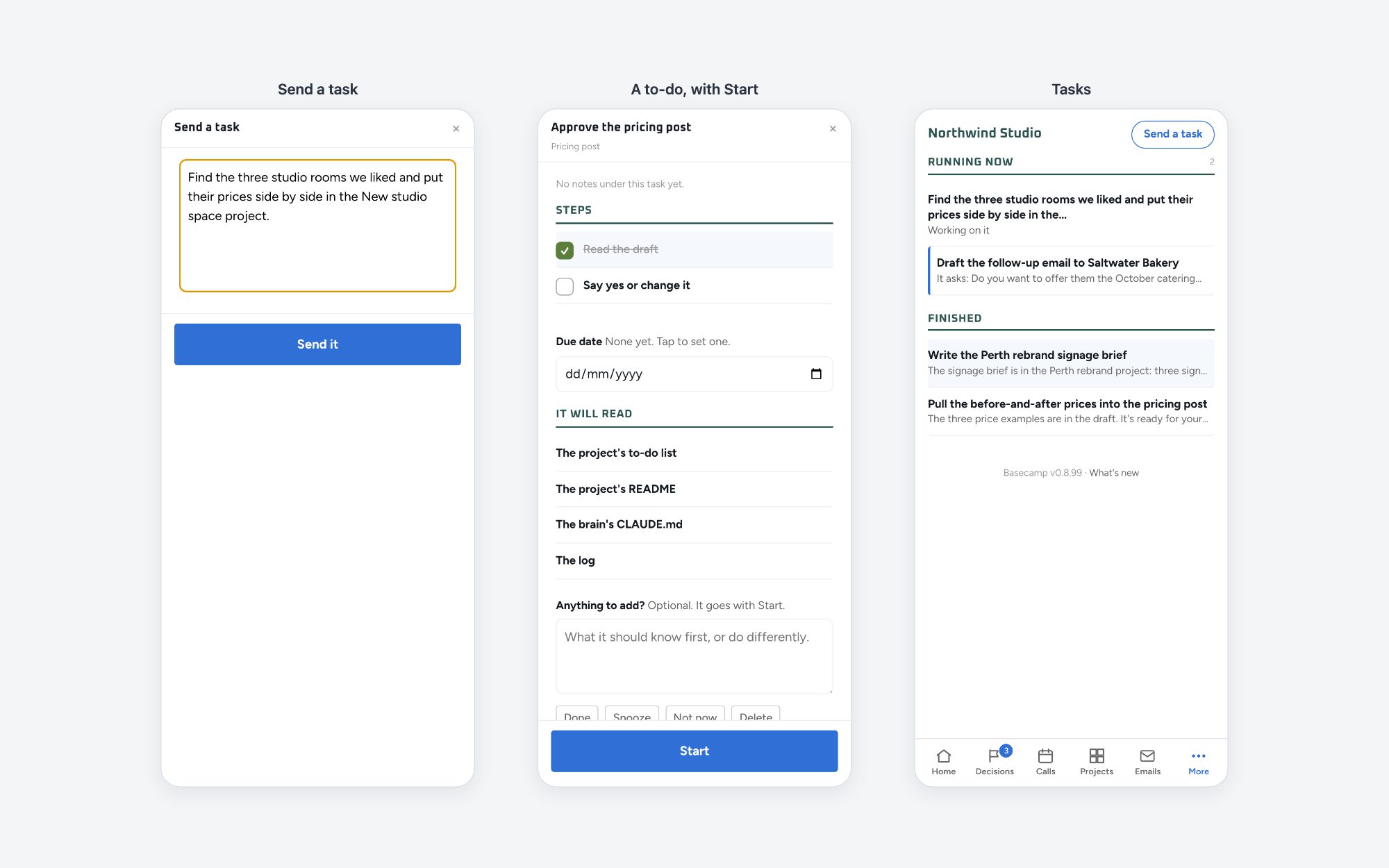
You can read your to-dos, tick them, answer a decision and send a task. A task runs on your computer with your own Claude, and your phone gets a notification when it is done. Nothing is copied online: your phone looks at Basecamp through a private web address, and a password you choose protects it.
What you need
- Basecamp on your computer. If you do not have it yet, get Basecamp first.
- A Mac or Windows computer, and an iPhone or an Android phone.
- Your computer on and awake. Your phone cannot reach Basecamp while the computer sleeps.
Set it up, in a team
The person who looks after your brain makes your private web address and sends you a message. Each person chooses whether to use Basecamp on their phone.
- On your computer, open Basecamp and go to Settings. Under Phone view, press Set up phone access.
- A conversation opens in Claude. Paste the message you were sent as your first reply.
- Choose your password in Settings. Nobody else sees it.
- On your phone, open your address and type the password. Then add Basecamp to your Home Screen.
- Press Turn on notifications, and send a practice task.
Set it up, on your own
You need a domain you own and a free Cloudflare account. Press Set up phone access and the conversation does the rest with you, one step at a time.
Send a task
Open Basecamp from your Home Screen and press Send a task. Say or type what you want done, the same way you ask in Claude. To start a to-do you already have, open it and press Start. If the task needs an answer from you, it waits and shows its question.
The Claude app
The Claude app on your phone has a Code tab. A task you start there runs in the cloud, so your computer can be off.
- It works on the online copy of your brain. It sees what is backed up there and nothing else.
- It cannot use a login or a connection that is kept only on your computer.
- What it changes comes back as a change that someone approves before it reaches your brain.
This route needs your own login to the online copy of your brain. Not everyone on a team has one. Ask the person who set up your brain if this is available to you.
Two more things about the Claude app
- The Chat tab cannot see your brain. It is good for thinking out loud. If you ask it to save something to your brain, it says yes, but nothing arrives.
- Remote Control lets you join, from your phone, a Claude session that runs on your computer. Everything on your computer works. You must start it before you leave your desk.
Which one?
- Use Basecamp on your phone when the task needs your files, your logins or your connections, and your computer is on.
- Use the Claude app when your computer is off, or when the task only needs what is backed up online.
Many people use both. Basecamp on the phone is new and still improving, so tell the person who set up your brain when something does not work.