What it is
Three things work together.
- Your brain knows how you work. It is a folder of files on your computer: your projects, clients, calls and notes.
- Claude is where the work gets done.
- Basecamp shows what to work on. It reads the files in your brain and lays them out as tabs.
Each button in Basecamp opens a conversation in Claude, in your brain folder, with the right words already in it.
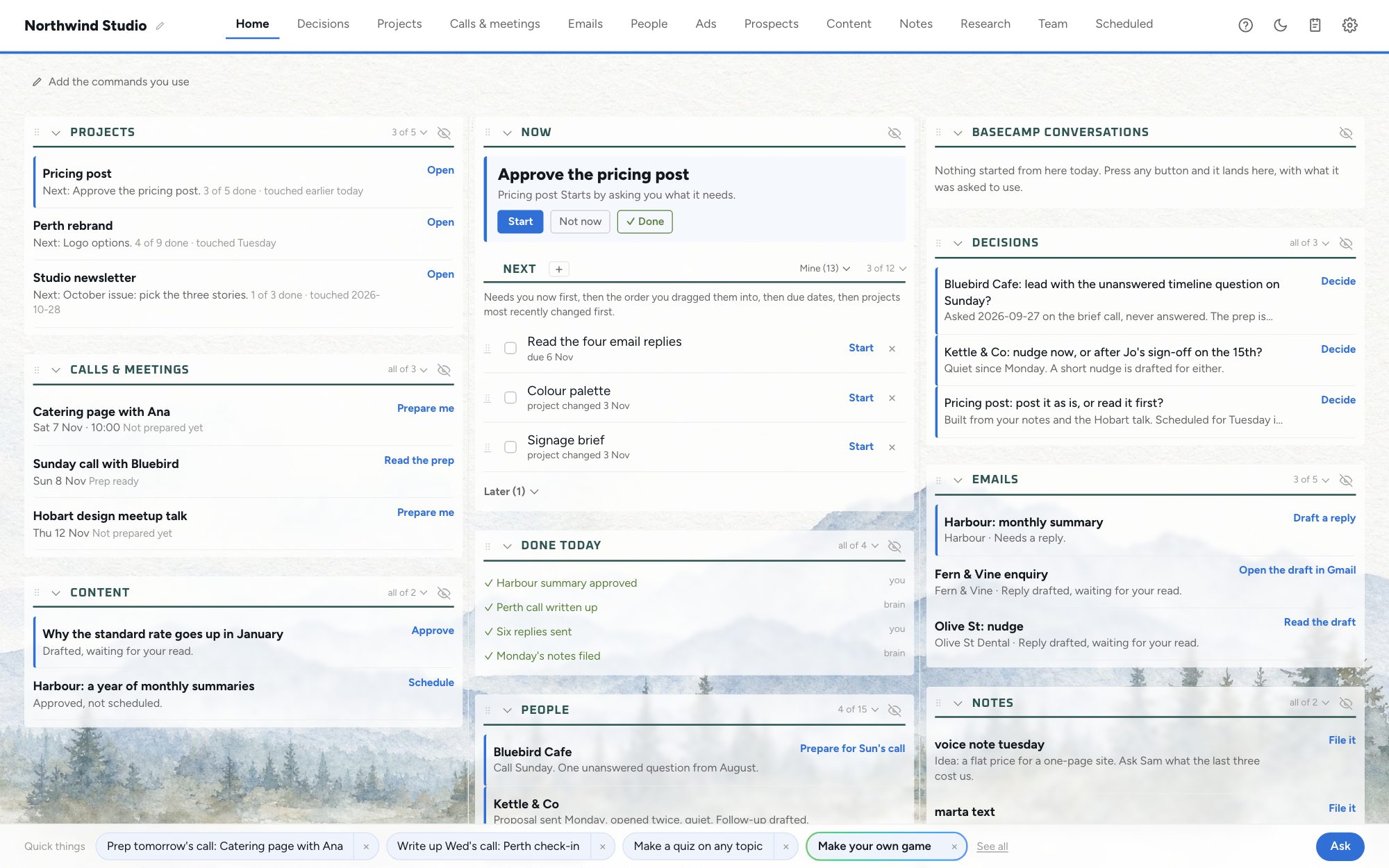
The picture shows a sample business. Your Basecamp shows your own work.
Get it
You need your brain on this computer first. If you do not have it yet, set up your brain and come back.
- Open the Claude desktop app and choose the Code tab.
- Choose your brain folder.
- Press Copy below and paste the text into Claude.
Install Basecamp for me. Do these steps in order.

Before step 1, check that the folder this conversation is running in is my brain: it has a CLAUDE.md or an AGENTS.md file at its top, and a .claude folder beside it. If it doesn't, download nothing, start nothing, and tell me: "This conversation isn't open in your brain folder, so Basecamp would start with an empty Home. Open the Claude desktop app, click Code at the top, choose your brain folder (the one with the CLAUDE.md file at its top), then paste this prompt again there." Then stop.

1. First look for a Basecamp folder already on this computer: ~/Projects/basecamp (on Windows, %USERPROFILE%\Projects\basecamp) holding server.cjs and a package.json whose "name" is "basecamp". Three cases.
   (a) No such folder: download https://setupyourbrain.com/download/basecamp and unzip it. The zip holds one folder called basecamp. Put that folder at ~/Projects/basecamp (on Windows, %USERPROFILE%\Projects\basecamp), outside my brain folder, then go on to step 2.
   (b) The folder is there AND it has been started before: ~/.basecamp/app (on Windows, %USERPROFILE%\.basecamp\app) names that folder, AND the one-click opener exists (on a Mac Basecamp.app in /Applications or ~/Applications; on Windows %USERPROFILE%\.basecamp\Basecamp.cmd plus the Basecamp shortcut on my desktop). Then Basecamp is installed: download nothing and don't ask me where to put a second copy. Tell me: "Basecamp is already installed. Open it from the Basecamp icon in your Dock, or press Cmd+Space and type Basecamp (Mac), or from the Basecamp shortcut on your desktop or in the Start menu (Windows). Basecamp updates itself: a newer version installs with no click within about half an hour, and Basecamp restarts by itself." Then stop.
   (c) The folder is there but either of those is missing (unzipped on an earlier try that never got as far as starting): it is a bare copy, not an install. Download nothing, never tell me to open Basecamp.app or a shortcut that isn't there, and carry on from step 2 inside that folder. Starting it in step 3 is what makes the opener and the login item.
2. Check that `node --version` works. If it doesn't, run scripts/get-node.sh (Mac) or scripts\get-node.cmd (Windows) inside the basecamp folder: it fetches Basecamp's own copy of Node, no admin password.
3. First tell me, in one line: "Starting Basecamp in the background now. It opens in your browser on its own in a few seconds, so you don't need to click anything." Then, from inside the basecamp folder, start Basecamp in the background so it keeps running after this conversation ends. Its output goes to a log in Basecamp's own state folder, so there is somewhere to look if it doesn't answer. On a Mac: mkdir -p ~/.basecamp, then nohup node server.cjs --open --ai claude --open-in app --brain "<the full path of the folder this conversation is running in, which is my brain>" >> ~/.basecamp/start.log 2>&1 & (on Windows, make %USERPROFILE%\.basecamp if it isn't there, then run the same node command through PowerShell's Start-Process with -WindowStyle Hidden, -RedirectStandardOutput "%USERPROFILE%\.basecamp\start.log" and -RedirectStandardError "%USERPROFILE%\.basecamp\start-err.log"). Put the path in quotes. Never run it in the foreground: Basecamp is a server that never finishes, so waiting for it only times out and stops it.
   Then check it answers at http://127.0.0.1:3860/api/tick, every couple of seconds for up to 20 seconds. If the port is already taken, start it again the same way with --port and any free port number, and check that port instead. If it still doesn't answer after 20 seconds, read ~/.basecamp/start.log (on Windows, both start.log and start-err.log in %USERPROFILE%\.basecamp), tell me its last lines in plain words, fix what they say (a missing Node, a port in use, a file that didn't unzip) and start it again the same way. Don't guess at the cause.
4. Once it answers, tell me Basecamp is open in my browser, that it asks one quick question the first time (which three kinds of work take most of my time), then says exactly what it adds to my brain and asks before running a short background setup that fills in Home, and that from now on Basecamp starts with my computer. On Windows there's a Basecamp shortcut on my desktop and in the Start menu that opens it any time (right-click it there to pin it to the taskbar). On a Mac, Basecamp is now in my Dock and in Applications, and Cmd+Space then typing Basecamp finds it too.

Don't change anything inside my brain folder yourself. Basecamp's last first-open screen says exactly what pressing Open Basecamp adds (a note with my picks, a page saying which files Basecamp reads, a copy of its Guide, one line in its log) and asks before anything else runs.
Claude downloads Basecamp, starts it and opens it in your browser. This takes about a minute. Basecamp asks one question the first time, then it shows your work.
After that, Basecamp starts with your computer. On a Mac, it is in your Dock. On Windows, it has a shortcut on your desktop and in the Start menu.
If something goes wrong, tell Claude what happened in your own words and let it try again. If you are still stuck, reply to your invite email and the person who set this up will help.
What you see
Basecamp has one tab for each kind of work. You choose which tabs to show.
- Home. What needs you now, what is next and what got done today.
- Decisions. The questions that wait for your answer, with the answers as buttons.
- Projects. Each project with its next task. You start a task from here.
- Calls. Your meetings, each with its preparation and its follow-up.
- Emails. Your inbox, beside what your brain knows about each sender.
- People. One line for each client or contact, with the next step.
There are more tabs in Settings. You can also add a tab for any work that repeats, such as proposals or reports, by describing it in words.
Make it yours
The person who set up your brain may have chosen the tabs and the button words you start with. After your first open, your own choices win.
- The words. Every button starts its conversation with a few paragraphs of words. You can read and change them on the Prompts page.
- The layout. Settings controls which tabs show, their order, the colours and the font.
- Anything else. Type the change you want in the Change anything box in Settings.
Good to know
It runs on your computer
Basecamp has no login and no online account. It never reads your conversations and it never sends your work anywhere. Two things leave your computer: a count of which buttons get used, and a check for a newer version.
It updates itself
A newer version installs with no click. Your words, your tabs and your settings stay as they are.
It does not replace your other tools
Keep your task list, your chat and your project tools. Basecamp connects the list of things to do with the way your business does them and the place they get done. A button can read a task from another tool, or tick it off there when the work is finished.
It is a work in progress
Basecamp is new and it changes often. The parts for a team that shares one brain are still being built. Basecamp works with Claude today, and other assistants come later.
Next: your phone
With Basecamp running, you can send a task from your phone and your computer does the work.